Tuesday, July 25, 2017

Monday, July 3, 2017
Data Binding Library
Data binding library are used to write declarative layouts and minimise the glue code necessary to bind your application logic and layouts.
Before start integration data binding, I would like to tell the some advantages of library.
Advantages of data binding library :
- Offers flexibility and broad compatibility
- Its a support library so we can use it with all android platforms
- Removes the boiler plate code
- Stronger readability
Tuesday, June 27, 2017
Android Launch Mode
Basically we could assign launch mode directly as an attribute of an
<activity> tag inside AndroidManifest.xml Manifest file list:
There are 4 types of launch modes. Let c one by one.
An example of this kind of Activity is a Compose Email Activity or a Social Network's Status Posting Activity. If you think about an Activity that can work separately to serve an separate Intent, think about standard one.
This is the default mode.
The behaviour of the activity set to this mode is a new activity will always be created to work separately with each intent sent.
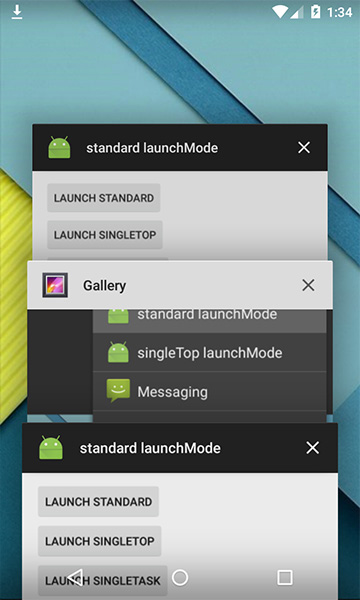 An example of this kind of activity is a Compose an Email Activity or a Social Network's status Posting activity. If you think about an activity that can work separately to serve an separate Intent, think about standard one.
singleTop
The next launch which appears when you hit control+space is singleTop,

It acts almost same as standard one which means that singleTop Activity instance could be created as many as we want. Only difference is if there already is an Activity instance with same type at the top of stack in the caller task, There would not be any new activity created, instead an intent will be sent an existing activity instance through onNewIntent(); Method
<activity> tag inside AndroidManifest.xml Manifest file list:
<activity android:name=".SplashScreen"
          android:configChanges="orientation|keyboardHidden|screenSize"
          android:label="@string/app_name"
          android:launchMode="standard"
          android:screenOrientation="portrait"
          android:theme="@android:style/Theme.Light.NoTitleBar.Fullscreen" >
    <intent-filter>
        <action android:name="android.intent.action.MAIN" />
        <category android:name="android.intent.category.LAUNCHER" />
    </intent-filter>
</activity>
There are 4 types of launch modes. Let c one by one.
An example of this kind of Activity is a Compose Email Activity or a Social Network's Status Posting Activity. If you think about an Activity that can work separately to serve an separate Intent, think about standard one.
standard
This is the default mode.
The behaviour of the activity set to this mode is a new activity will always be created to work separately with each intent sent.
An example of this kind of activity is a Compose an Email Activity or a Social Network's status Posting activity. If you think about an activity that can work separately to serve an separate Intent, think about standard one.singleTop
The next launch which appears when you hit control+space is singleTop,

It acts almost same as standard one which means that singleTop Activity instance could be created as many as we want. Only difference is if there already is an Activity instance with same type at the top of stack in the caller task, There would not be any new activity created, instead an intent will be sent an existing activity instance through onNewIntent(); Method
Tuesday, June 20, 2017
Thursday, June 15, 2017
Android N changes
| PERMISSIONS (To be given runtime of application) supports heigher verisons of phone >23.0 | PERMISSIONS (To be given in app Manifest) supports older version <23.0 |
| STORAGE Used for runtime permissions related to the shared external storage. | android.permission.INTERNET |
| CAMERA Used for permissions that are associated with accessing camera or capturing images/video from the device. | android.permission.CAMERA |
| CONTACT Used for runtime permissions related to contacts and profiles on this device. | android.permission.RECORD_AUDIO |
| LOCATION Used for permissions that allow accessing the device location. | android.permission.MODIFY_AUDIO_SETTINGS |
| MICROPHONE Used for permissions that are associated with accessing microphone audio from the device. | android.permission.BODY_SENSORS |
| PHONE Used for permissions that are associated telephony features. | (GCM requires a Google account) android.permission.GET_ACCOUNTS |
| SENSORS Used for permissions that are associated with accessing camera or capturing images/video from the device. | (Keeps the processor from sleeping when a message is received) android.permission.WAKE_LOCK |
| SMS Used for runtime permissions related to user's SMS messages. | (This app has permission to register and receive data message) com.google.android.c2dm.permission.RECEIVE |
android.permission.ACCESS_NETWORK_STATE | |
android.permission.VIBRATE | |
android.permission.READ_PHONE_STATE | |
android.permission.ACCESS_FINE_LOCATION | |
android.permission.SEND_SMS | |
android.permission.CALL_PHONE | |
android.permission.WRITE_EXTERNAL_STORAGE | |
android.permission.RECEIVE_SMS | |
android.permission.READ_CALENDAR android.permission.WRITE_CALENDAR | |
Friday, June 9, 2017
Friday, May 19, 2017
Whats new in Android O for developer
From recent I/O 2017 some of the features which Google has brought are to the developers.
- Pictures in Pictures
If you have already declared the configChanges="true" than you don't have to mention supportsPictureInPicture="true"
- Color Management
Support for wide-gamut displays
16-bit PNG, ICC profiles PNG/Webp/JPEG
color accurate rendering of bitmaps
New utilities color - Multi-DisplayMulti-display = Multi-Window
user controlled or app controlled with ActivityOptions
Test Configuration Changes - Media ......Continued.....
- Kotlin new programming language introduce, quite similar to JAVA, just with optimised syntax.


