Friday, September 1, 2017

Reactive Native Sample App


What is reactive native ?Reative Native is an framework for designing the native mobile applications.
It is javascript code library developed by facebook available on Github from 2013

React Native helps the developer to reuse the code across web and on mobile
Ex : Facebook,

What platform the reactive native supports ?
IOS and Android
Saturday, August 26, 2017

Sunday, August 6, 2017

Mockito Framework

Mockito is a mocking framework, it is widely used the in unit testing JAVA application.

Unit testing is used to maintain & improve the quality of product through unit testing and test-driven development

Mocking is the process of testing the functionality of class in isolation.

Mocking does not require database connection or properties file read or file server read to test functionality. A Mock object returns some dummy data corresponding to some dummy input.

Mock object are nothing but proxy for actual implementation 

Tuesday, July 25, 2017

Monday, July 3, 2017

Data Binding Library


Data binding library are used to write declarative layouts and minimise the glue code necessary to bind your application logic and layouts.


Before start integration data binding, I would like to tell the some advantages of library.

Advantages of data binding library :

  • Offers flexibility and broad compatibility

  • Its a support library so we can use it with all android platforms

  • Removes the boiler plate code
  • Stronger readability 
librar


Tuesday, June 27, 2017

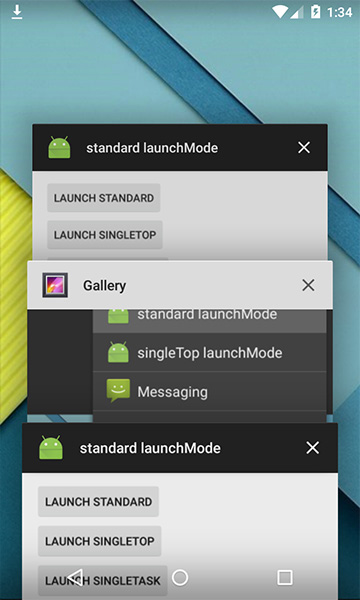
Android Launch Mode

Basically we could assign launch mode directly as an attribute of an
 
<activity>  tag inside AndroidManifest.xml Manifest file list:

<activity android:name=".SplashScreen"   
          android:configChanges="orientation|keyboardHidden|screenSize" 
          android:label="@string/app_name"   
          android:launchMode="standard" 
          android:screenOrientation="portrait"    
          android:theme="@android:style/Theme.Light.NoTitleBar.Fullscreen" >
    <intent-filter>
        <action android:name="android.intent.action.MAIN" />
        <category android:name="android.intent.category.LAUNCHER" />
    </intent-filter>
</activity>

There are 4 types of launch modes. Let c one by one.
An example of this kind of Activity is a Compose Email Activity or a Social Network's Status Posting Activity. If you think about an Activity that can work separately to serve an separate Intent, think about standard one.

standard


This is the default mode.

The behaviour of the activity set to this mode is a new activity will always be created to work separately with each intent sent.


gallerystandardl2An example of this kind of activity is a Compose an Email Activity or a Social Network's status Posting activity.  If you think about an activity that can work separately to serve an separate Intent, think about standard one.

singleTop


The next launch which appears when you hit control+space is singleTop,


It acts almost same as standard one which means that singleTop Activity instance could be created as many as we want. Only difference is if there already is an Activity instance with same type at the top of stack in the caller task, There would not be any new activity created, instead an intent will be sent an existing activity instance through 
onNewIntent(); Method

Tuesday, June 20, 2017